
File Updates
Hey all :)
Been busy pushing files through into the library and the coding goblins have added a load of Scriptorium updates.
First up, the mine.
The full set of mine track floors are in now - 35 pieces. Straights, curves, junctions, crossovers, S-bends, a cross, a tee, buffers for the dead ends. Enough to run track right through a cave system and have it actually go somewhere.
To go with it there's a mine cart. The cart is the first piece to use a new Scriptorium feature - it's one file that you can open in Scriptorium and it's built. Open the same file in your slicer and it's laid out on the bed ready to go. More pieces are going to work this way.
The Cavern Rock floors are in too - they went in just after the walls - so you've now got the complete cave to lay the track through.
Water.
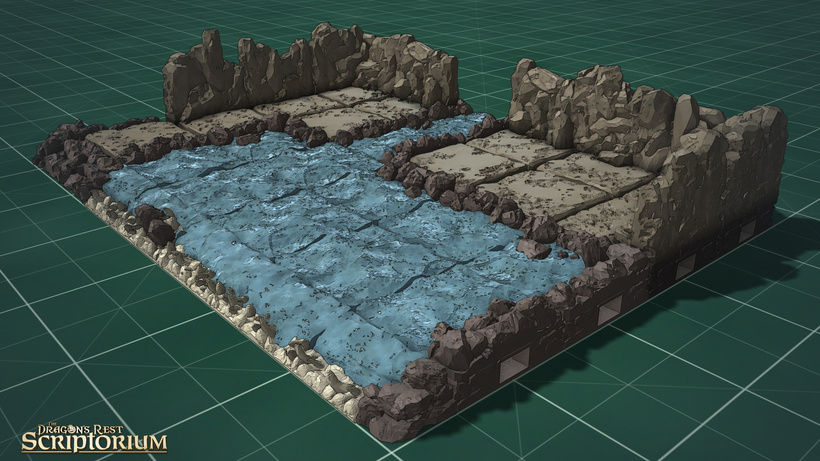
The water floor tiles, including ones with rocky banks have been updated and added to. There's also new water edges to run around the edge of a layout so they don't just stop dead.
Other Edges.
All the rock edges and a big set of grass edges - clumps, steps, inner and outer corners have been updated to work in Scriptorium.
Where to find all the new stuff:
Floors → Mine Track
Decor → Mine Cart
Decor → Ladders
Decor → Beams
Floors → Cavern Rock
Floors → Water
Edges → Water / Rocks / Grass.
I did a small tidy-up while I was in there - the Parts and Negatives folders are gone. Bits now sit beside the thing they belong to, so you shouldn't have to go hunting.
Everything's coloured and set up to build straight away in Scriptorium
Scriptorium's had a big month too.
The goblins have been busy. The bits you'll notice:
-
Build guides are proper now. Export a build guide and each piece gets a number, there's a plan from above for each step with the numbers on it, a parts list, and a filament estimate in grams so you know what a build is going to cost you before you start.
In a folder's settings you can mark it as a 'chapter' or 'step' to split the exported build guide in the correct place -
Export packed onto your print bed. in Settings/Print bed you can set what printer you have (there are presets for the usual Bambu, Prusa, Elegoo and Creality beds). In export set the plates to 'packed onto plates' and the Print project exports will then export one file per plate, ready to drop into your slicer.
-
Lighting. There's a looks panel under the camera icon with presets - daylight, dusk, moonlit, torchlit dungeon, crypt, forge, and so on - and you can also drop light zones onto a layout so one room glows warm while the corridor next to it stays cold. Great for previews and handouts.
-
Download a whole folder from the library in one go. Select a folder and click the blue download button and all files in that folder will be downloaded as a zip file. There's also a little "New in the library" card pops up when there's something you haven't synced yet.
-
Search in plain words. Type "stairs" or "slot" and it finds the right pieces even if the filename calls them something else.
-
Store members can now sign in with their Dragon's Rest account and the library just opens - no monthly code. If you're here on Patreon, nothing changes, the code works as it always has but there's work being done to get this working with MMF and Patreon too :)
And a lot of quiet fixes underneath - every file in the library has been checked so it slices cleanly, cuts behave better, and you can orbit under a model now to place clip holes.
Scriptorium updates itself if you've saved it as an app, so you've probably got all of this already.
There's another pile of scatter and decor that's gone in as well - gargoyles, corbels, chains, floor studs, flowers and the like - but that's a post of its own, early next week.
Ian :)


